
Understanding DHCP: Dynamic Host Configuration Protocol
An in-depth technical guide covering fundamentals to enterprise best practices.
❓ What is DHCP?
Dynamic Host Configuration Protocol (DHCP) is a network management protocol used to automatically assign IP addresses and other network configuration parameters to devices on a network. Rather than requiring a network administrator to manually configure each device, DHCP allows hosts to obtain their IP configuration dynamically from a centralised server — making network management significantly more efficient and scalable.
DHCP operates at the Application Layer (Layer 7) of the OSI model and uses UDP ports 67 (server) and 68 (client) for communication. It is defined by RFC 2131 and supersedes the older BOOTP protocol, adding support for temporary IP address leasing and a wider range of configuration options.
Prior to DHCP being widely adopted; network administrators had to manually configure IP addresses, subnet masks, default gateways, and DNS server information for every single device on a network — a task that became increasingly unmanageable as organisations grew. It was introduced to automate this process entirely, eliminating configuration errors and dramatically reducing administrative overhead.
DHCP is one of the most fundamental protocols in modern networking. Without it, every device joining a network — from laptops to smartphones to IoT sensors — would require manual IP configuration, making large-scale network management essentially impractical.
Originally developed by Ralph Droms and standardised in 1993, DHCP has become a cornerstone of both enterprise networks and consumer environments. It supports IPv4 (DHCPv4) and has been extended for IPv6 as DHCPv6 (RFC 3315).
🧩 Key Components
A fully functional DHCP implementation consists of several interdependent components. Understanding each component is essential for planning, deploying, and troubleshooting DHCP in any environment.
DHCP Server
The central service responsible for managing and assigning IP addresses. It maintains the IP address pool and lease database. Common implementations include Windows Server, ISC DHCP (Linux), and Cisco IOS.
DHCP Client
Any network device (workstation, phone, printer, IoT device) that requests configuration from a DHCP server. Clients broadcast a DHCPDISCOVER message when they first connect to a network.
IP Address Pool (Scope)
A defined range of IP addresses the DHCP server can assign. For example, 192.168.1.100–192.168.1.200. A scope also includes subnet mask, lease duration, and option values.
Lease
The temporary assignment of an IP address to a client for a defined period (lease time). Once expired, the client must renew or request a new address. Typical lease durations range from 1 to 8 days.
Relay Agent
A router or Layer 3 switch configured with the ip helper-address command (Cisco IOS) to forward DHCP broadcasts across network segments to a centralised server.
DHCP Options
Additional configuration parameters passed to clients alongside the IP address, including Option 3 (Default Gateway), Option 6 (DNS Servers), Option 15 (Domain Name), and Option 42 (NTP Servers).
Reservations (Static Binding)
A mapping that permanently assigns a specific IP address to a device based on its MAC address. This combines the reliability of static addressing with the centralised management of DHCP.
Lease Database
A persistent record of all active and expired leases, including client MAC addresses, assigned IPs, hostnames, and expiry timestamps. Critical for troubleshooting IP conflicts.
Forgetting to configure a relay agent (
ip helper-address) on inter-VLAN routers or Layer 3 switches is one of the most frequent issues seen in enterprise deployments. Without it, DHCP broadcasts from clients on remote subnets will never reach the centralised server.
⚙️ How DHCP Works
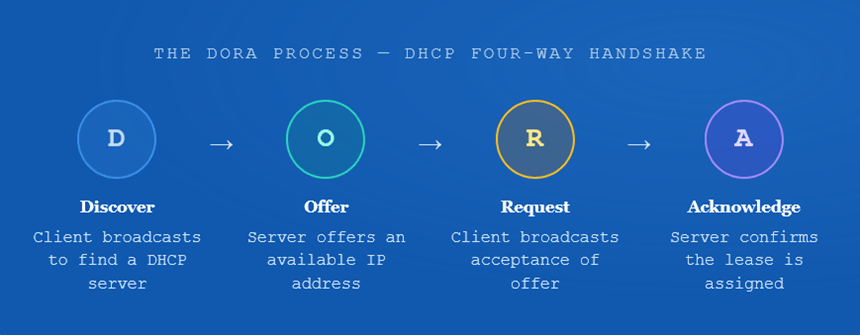
DHCP uses a four-step exchange process, commonly referred to as DORA — Discover, Offer, Request, Acknowledge. This process occurs every time a new client joins the network or when an existing lease expires. This handshake completes within milliseconds on a typical LAN and transparently provides all required network configuration to the client.
When a device connects to the network with no IP configuration, it sends a DHCPDISCOVER broadcast (destination 255.255.255.255, source 0.0.0.0) using UDP. This message contains the client’s MAC address and is heard by all devices on the local subnet, including any DHCP servers.
Upon receiving the DISCOVER, the DHCP server selects an available IP address from its pool, temporarily reserves it, and sends a DHCPOFFER back to the client. This offer includes the proposed IP address, subnet mask, default gateway, DNS servers, and lease duration.
If multiple DHCP servers respond, the client selects the first offer received and broadcasts a DHCPREQUEST message, formally requesting the offered configuration. This broadcast also notifies other servers that their offers were declined, allowing them to release the reserved addresses.
The selected DHCP server sends a DHCPACK (acknowledgement), confirming the lease and delivering all configuration options. The client then applies these settings and begins using the IP address. The server records the lease in its database.
Lease Renewal Process
DHCP leases are not permanent. At 50% of the lease period (T1), the client unicasts a DHCPREQUEST to the original server to renew. If no response is received, at 87.5% (T2), the client broadcasts to any available DHCP server. If renewal fails entirely before expiry, the client must restart the DORA process and ceases using the address upon lease expiry.
Router# show dhcp lease

! Displays all active DHCP leases obtained by this device
Router# show ip interface brief

! Confirms which interfaces have DHCP-assigned addresses
Router(config-if)# ip address dhcp

! Configure an interface to obtain its IP address via DHCP
DHCP Across Multiple Subnets — The Relay Agent
DHCP relies on broadcasts, and routers do not forward broadcasts by default, a DHCP Relay Agent is required when the server resides on a different subnet from the clients. In Cisco IOS, this is configured using the ip helper-address command on the interface closest to the clients. The Relay Agent intercepts local broadcast DHCPDISCOVER packets, rewrites them as unicast packets, and forwards them to the DHCP server’s IP address. The server’s response is then relayed back to the client’s subnet.
! ── DHCP Server Configuration ──────────────────────────────

Router(config)# ip dhcp pool OFFICE_LAN

Router(dhcp-config)# network 192.168.10.0 255.255.255.0

Router(dhcp-config)# default-router 192.168.10.1

Router(dhcp-config)# dns-server 8.8.8.8 8.8.4.4

Router(dhcp-config)# domain-name corp.internal

Router(dhcp-config)# lease 3 ! 3-day lease

Router(dhcp-config)# exit
! ── Exclude Static/Reserved Addresses ──────────────────────

Router(config)# ip dhcp excluded-address 192.168.10.1 192.168.10.20
! ── Relay Agent on Remote Subnet Interface ──────────────────

Router(config)# interface GigabitEthernet0/1

Router(config-if)# ip helper-address 10.0.0.10

! Forwards DHCP broadcasts to the server at 10.0.0.10
Always exclude the first 10–20 addresses in any DHCP scope using
ip dhcp excluded-address before defining the pool. This reserves those addresses for network infrastructure — routers, switches, servers, and printers — preventing conflicts with dynamically assigned clients.
📊 Usage & Functions
DHCP is used in virtually every type of IP network — from home routers to global enterprise infrastructure. Its use extends beyond simple IP address assignment to a rich set of configuration delivery functions.
| DHCP Option | Option Code | Purpose | Example Value |
|---|---|---|---|
| Subnet Mask | 1 | Defines the network boundary for the client | 255.255.255.0 |
| Default Gateway | 3 | First-hop router for traffic leaving the subnet | 192.168.1.1 |
| DNS Servers | 6 | Name resolution servers for domain lookups | 8.8.8.8, 1.1.1.1 |
| Domain Name | 15 | Default DNS search domain for unqualified hostnames | corp.internal |
| NTP Servers | 42 | Time synchronisation servers | 192.168.1.10 |
| WINS/NBNS | 44 | Windows Internet Name Service for NetBIOS resolution | 192.168.1.15 |
| Lease Time | 51 | Duration in seconds for which the IP is valid | 86400 (24 hours) |
| TFTP Server | 66 | Boot server for diskless workstations or IP phones | 192.168.1.20 |
| WPAD | 252 | Web Proxy Auto-Discovery URL for automatic proxy config | http://wpad.corp/proxy.pac |
Common Deployment Scenarios
Enterprise Campus Networks: Large organisations typically run a centralised DHCP server (Windows Server DHCP or ISC DHCP on Linux) with relay agents configured on each VLAN interface of a core or distribution Layer 3 switch. Separate scopes are defined per VLAN, with options customised for each user segment (data, voice, management).
Voice over IP (VoIP) Networks: Cisco IP phones use DHCP Option 150 (TFTP Server Address) or Option 43 to receive the address of the Cisco Unified Communications Manager (CUCM) call processor. Without this option, phones cannot register and make calls.
PXE Boot & Diskless Workstations: DHCP Options 66 and 67 specify the TFTP server address and boot filename respectively, enabling network boot (PXE) for provisioning systems across the network without physical media.
Home & Small Office Networks: Consumer routers include built-in DHCP servers that automatically assign addresses from a private range (typically 192.168.0.x or 192.168.1.x) to all connected devices on the LAN and Wi-Fi segments.
In IPv6 networks, two mechanisms exist for automatic address configuration: DHCPv6 (stateful, similar to DHCPv4) and SLAAC (Stateless Address Autoconfiguration). DHCPv6 provides greater administrative control and delivers options like DNS, while SLAAC allows devices to self-configure based on the router advertisement prefix. Many modern networks use a combination of both.
✅ Best Practices
Whether you’re managing a small office or a large enterprise network, following established best practices reduces IP conflicts, improves reliability, and simplifies troubleshooting. Below are the most important recommendations for real-world deployment.
- Always exclude infrastructure addresses. Use
ip dhcp excluded-addressto reserve a block of addresses (typically the first 10–30) for routers, switches, servers, printers, and access points. This prevents dynamic clients from being assigned addresses already in use by static devices. - Use DHCP reservations for critical devices. Bind specific MAC addresses to specific IPs for devices like printers, IP cameras, servers, and managed switches. This maintains consistency without managing static configurations locally on each device.
- Set appropriate lease times. Use shorter leases (1–4 hours) in high-turnover environments such as conference rooms, guest Wi-Fi, and public hotspots. Use longer leases (3–8 days) for stable corporate desktops. This balances address pool efficiency against DHCP traffic volume.
- Configure DHCP Snooping on switches. DHCP Snooping is a Layer 2 security feature that prevents rogue DHCP servers from issuing addresses on the network. Mark only ports connected to legitimate DHCP servers as “trusted.” This is critical for preventing man-in-the-middle attacks.
- Implement DHCP failover / high availability. In enterprise environments, configure DHCP failover between two servers (hot standby or load sharing) to eliminate single points of failure. Windows Server supports native DHCP failover; Linux ISC DHCP supports failover via the
failover peerconfiguration. - Monitor scope utilisation. Regularly monitor pool utilisation. When utilisation consistently exceeds 80–85%, it is time to expand the scope, split the subnet, or reduce lease times. Exhausted pools cause IP starvation, denying new devices access to the network.
- Document every scope and option. Maintain clear documentation of all DHCP scopes, exclusion ranges, reservations, options, and lease times. This is invaluable during incidents, audits, and infrastructure changes — particularly when multiple administrators manage the network.
- Separate DHCP pools by VLAN / user segment. Define distinct pools for each VLAN — data, voice, guest, management. This enforces segmentation, allows segment-specific options (e.g., Option 150 for voice VLAN only), and makes troubleshooting significantly easier.
- Enable DHCP logging and alerting. Configure your DHCP server to log lease events and set up alerts for pool exhaustion, duplicate IP detection, and rogue server activity. Centralise logs into your SIEM or syslog server for retention and analysis.
- Test after every change. After modifying scopes, options, or server configurations, always test from a client device by releasing and renewing the DHCP lease (
ipconfig /releaseandipconfig /renewon Windows;dhclient -r && dhclienton Linux) to verify correct assignment.
Switch(config)# ip dhcp snooping

Switch(config)# ip dhcp snooping vlan 10,20,30

! Apply snooping to VLANs 10, 20 and 30
Switch(config)# interface GigabitEthernet0/1

! Uplink to legitimate DHCP server — mark as trusted

Switch(config-if)# ip dhcp snooping trust
Switch(config)# interface GigabitEthernet0/2

! Client-facing port — untrusted by default, rate-limited

Switch(config-if)# ip dhcp snooping limit rate 15

! Limits to 15 DHCP packets per second to prevent starvation attacks
⚖️ Pros & Cons
Like any protocol, DHCP has both significant advantages and notable limitations. Understanding both sides is essential for making informed architectural decisions.
✔ Advantages
- Eliminates the need for manual IP configuration on every device, drastically reducing administrative overhead in large environments.
- Greatly reduces the risk of human error in IP address entry, such as typos causing duplicate IPs or incorrect subnet masks.
- Efficient reuse of IP addresses — expired leases return addresses to the pool for reassignment to other devices.
- Delivers a comprehensive set of network configuration parameters beyond just the IP address, including DNS, gateway, NTP, and TFTP.
- Scales seamlessly from a two-device home network to hundreds of thousands of devices across a global enterprise.
- Centralised management of IP allocations provides a single point of visibility and control across the entire network.
- Supports DHCP Snooping, Dynamic ARP Inspection (DAI), and IP Source Guard for enhanced Layer 2 security.
- Simplifies device moves, additions, and changes (MACs) — devices automatically receive correct config when connected to a new port or VLAN.
- DHCP reservations combine the predictability of static addressing with the management convenience of DHCP.
- Widely supported by all major operating systems, network devices, and vendors — a universally interoperable standard.
✘ Disadvantages
- DHCP servers are a single point of failure unless high availability (failover) is configured — if the server is down, new clients cannot join the network.
- IP addresses can change between sessions unless reservations are used, which can cause issues with servers, printers, and other infrastructure devices.
- DHCP relies on broadcast traffic for discovery, which doesn’t cross router boundaries by default, requiring relay agent configuration.
- Vulnerable to attacks such as DHCP starvation (exhausting the IP pool) and rogue DHCP servers without proper security hardening.
- DHCP traffic introduces additional network overhead, particularly in environments with very short lease times generating frequent renewals.
- Troubleshooting IP conflicts or stale leases can be complex in large environments without proper monitoring and logging tools.
- Dynamic addressing is not suitable for devices that require consistent, predictable IPs (e.g., web servers, DNS servers, NAS devices) without additional reservation management.
- DHCP option support varies between clients — not all devices correctly request or process vendor-specific options (Option 43, Option 60).
🎯 Conclusion
DHCP is one of the most essential and foundational protocols in modern IP networking. From automatically handing out IP addresses to delivering a rich set of network configuration parameters, it underpins the seamless connectivity that users and organisations depend on every day.
Understanding DHCP deeply — from the DORA handshake to relay agents, scope design, security hardening with DHCP Snooping, and high availability — is not just an academic exercise. It is a core practical skill for any network engineer.
Whether you’re deploying a new office network, troubleshooting connectivity issues, or hardening an enterprise environment against Layer 2 attacks, a strong command of DHCP will serve you well throughout your networking career. Configure it thoughtfully, document it thoroughly, monitor it proactively — and it will largely look after itself.
As networks continue to evolve with IPv6, cloud infrastructure, and zero-trust security models, DHCP remains highly relevant. DHCPv6, combined with SLAAC and modern network management platforms, ensures this protocol will continue to be a critical tool in every network engineer’s toolkit for years to come.
📖 Glossary
Key terms and acronyms referenced.
Dynamic Host Configuration Protocol — automatically assigns IP addresses and configuration to network clients.
The four-step DHCP process: Discover, Offer, Request, Acknowledge.
A defined range of IP addresses and options that a DHCP server can assign to clients on a given subnet.
The temporary allocation of an IP address to a client for a defined period of time.
A router or switch configured to forward DHCP broadcast messages to a DHCP server on a different subnet.
Cisco IOS command used to configure an interface to forward DHCP broadcasts as unicasts to a specified server IP.
Supplementary parameters delivered to clients alongside an IP address — e.g., DNS servers (Option 6), default gateway (Option 3).
A static binding that maps a specific MAC address to a specific IP address within DHCP, ensuring consistent assignment.
A Layer 2 security feature on managed switches that prevents rogue DHCP servers from issuing addresses on the network.
A DoS attack where an attacker floods the DHCP server with requests using spoofed MAC addresses to exhaust the IP pool.
The IPv6 extension of DHCP, defined in RFC 3315, providing stateful IP address configuration for IPv6 networks.
Stateless Address Autoconfiguration — IPv6 mechanism allowing devices to self-assign addresses based on router-advertised prefixes.
T1 (50% of lease) triggers unicast renewal; T2 (87.5% of lease) triggers broadcast renewal if T1 renewal failed.
Bootstrap Protocol — the predecessor to DHCP, lacking lease-based addressing and limited in configuration options.
User Datagram Protocol — the transport layer protocol used by DHCP (ports 67 and 68) for its lightweight, broadcast-capable messaging.
Preboot Execution Environment — uses DHCP Options 66/67 to boot a device over the network without a local operating system.